Database Design and Development
Notes
All the database code examples use SQLite. They will work with DB Browser for SQLite.
These notes are focused on N5 Computing Science so some terms might be used differently.
SQLite, and SQL, keywords are not case sensitive. The following are all equally valid:
SELECT / SeLeCt / select
In the examples, the keywords will be in uppercase.
SQLite, and SQL, is not whitespace sensitive. This means a statement can be all on a single line or split over multiple lines. In general, the examples have one keyword per line.
The statements are terminated with a semicolon, ;. An individual statement will run without a semicolon but multiple statements will not.
Attribute types (Data types)
SQLite has fewer data types than SQL. However, SQL datatypes can be used and SQLite will match these to it's own datatypes.
| Data type | Example data |
|---|---|
| Text | "Cat", "01871 810100" |
| Number (INT) | -99, 0, 99 |
| Number (REAL) | -99.0, 0.0, 99.0 |
| Date | "2024-02-29" |
| Time | "13:15:00" |
| Boolean | TRUE, FALSE |
Example Data
The example database contains the tables and records that the SQL examples will work with. The file can be opened with DB Browser for SQLite.
The first 4 records of the data used in the examples are shown in the following tables:
Table: Pet
| petID | name | species | dob |
|---|---|---|---|
| 1 | Hans | Cat | 2015-09-22 |
| 2 | Minnnie | Gerbil | 2021-05-24 |
| 3 | Bo | Rabbit | 2011-10-13 |
| 4 | Joscelin | Gerbil | 2022-02-19 |
Table: Vaccination
| vaxID | petID | vaxDate | vaxTame | reaction | price |
|---|---|---|---|---|---|
| 1 | 13 | 2019-09-03 | Distemper | TRUE | 45.00 |
| 2 | 5 | 2020-06-23 | Canine hepatitis | FALSE | 35.50 |
| 3 | 1 | 2015-12-17 | Cat Flu | FALSE | 12.99 |
| 4 | 17 | 2015-10-05 | Cat Flu | FALSE | 12.99 |
ER Diagram
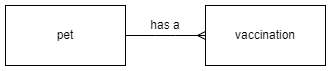
Views tables
To view all the tables in the database the name field of the sqlite_schema table is displayed.
SELECT name
    FROM sqlite_schema
    WHERE type = "table";
Information
Comments
Single line comment.
-- This comment is not displayed
Multiline comment.
/*
This comment is not displayed
This comment is not displayed
*/
Display information
It is possible to display simple messages (DB Browser for SQLite).
SELECT "Hello World!";